
Banner Hero
Find out more about the Banner Hero content type, when you should use it and what information to include.
When to use a Banner Hero
A Banner Hero is a type of webpage banner. This content type includes an optional button, allowing you to direct users to the link right at the top of your page.
If you need to signpost to multiple links from your landing page, then use a Header Banner instead use a Header Banner.
Example
The Banner Hero content type should be Queen Mary blue and contain -
- Page title.
- Description sentence.
- Image (please ensure you have the correct permissions for any image you use).
- Button linking to the high-priority page you want to direct users to – remember to use descriptive text on the button as shown in the image below, rather than phrases like ‘Click here’ or ‘More info’.
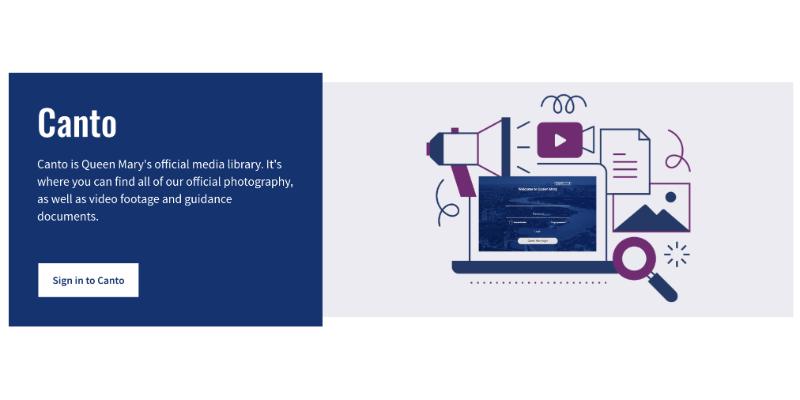
An example of the Banner Hero content type on our Canto webpages.
Creating a Banner Hero
Components
This content type only has one component and can be added directly to the page on which you would like it to appear.
If the ‘Banner hero’ content type is not listed as an option once you have selected '+ Add Content', please contact websupport@qmul.ac.uk.
Adding the content type to your webpage
Below are the different fields you will fill in when creating a Banner Hero, and what information you should include.
Name
This is how your content type will be named within the backend of T4 and will not be publicly visible.
Heading
This should be the heading you want to appear at the top of the page, ie what you want your page to be called.
Supporting Text
This is where you should introduce the purpose of the page with a brief summary.
Button Text
Add you descriptive link text for the link you will be adding.
Link
Here you link to the page you are signposting to.
- Section link – Use this to link to a T4 webpage.
- Content link – Use this to link to a specific T4 news story or staff profile.
- External link – Use this to link to a page outside of T4
Images
Add your images to appear within your banner. Make sure the images follow accessibility guidelines and have been adjusted to fit each variant required within T4.
Colour
Please leave this as 'Blue' unless you have been advised to use a different colour.