
Card
The Card content type is the default way to signpost to webpages on T4. Find out how to add them to your webpage, and what information you should include.
When to use Cards
The Card content types allows you to add signposting cards to your webpage. If you would like your link to stand out on the page, rather than it be hyperlinked text, this is the first content type you should use.
Example
The Card content type has the following elements -
- Title
- Description sentence
- Link
- Image
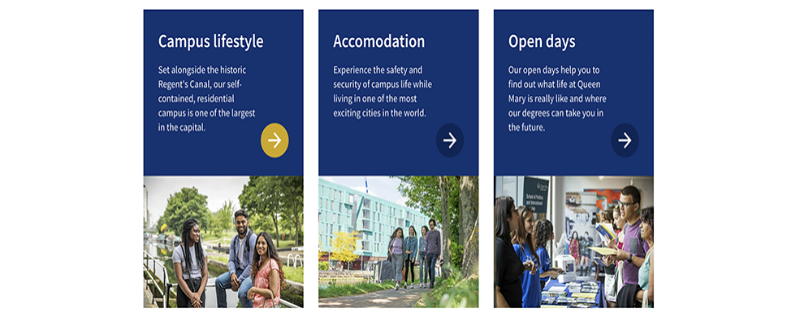
Cards in a three-card container with an image and caption.
Creating the Card content type
Components
This content type has two components, and you will need both for your cards to appear correctly.
- Card Container
- Card
If either of these content types are not listed as an option once you have selected '+ Add Content', please contact websupport@qmul.ac.uk.
Adding the content type to your webpage
Card Container
The Card Container element should sit on the webpage you would like the cards to appear on.
Name
This is how your content type will be named within the backend of T4 and will not be publicly visible.
Group
This is to tell T4 which items you would like to group together. Usually, you will only have one group of cards on a page, so would only choose group one.
Card
For the cards to show on the page inside the stat container, you'll have to put them in a child section of the page that you are editing.
Create a child section.
- Name this child section as 'Cards'.
- Note: It is crucial to name the section exactly as written above otherwise the stat content types won't be pulled through to the page.
Name
This is how your content type will be named within the backend of T4 and will not be publicly visible.
Title
This should be the title of the page you are signposting to.
Description
This is the description sentence for the page you are linking to.
Link
Here you link to the page you are signposting to.
Section link – Use this to link to a T4 webpage.
Content link – Use this to link to a specific T4 news story or staff profile.
External link – Use this to link to a page outside of T4.
Image
Add the image you would like to have appear on the card. It should be 525 x 350 pixels.
Blue
Tick this button to make your card blue. If you don’t tick this box, your card will be grey. We recommend making your primary signposts blue, and secondary signposts grey.
Group
This number should match the number you have added to your Card Container.